Document capture errors can slow onboarding, weaken OCR accuracy, and cause genuine customers to abandon verification. Common problems include blur, glare, cropped edges, poor lighting, perspective distortion, and submission of the wrong document side.
The answer is not to lower image-quality or security standards. Businesses should detect correctable problems before submission, provide precise recapture guidance, and distinguish ordinary capture errors from document manipulation or suspicious capture sources.
FinAuth combines real-time quality analysis, OCR, Document Verification, capture-integrity checks, and risk-based decisioning to help legitimate users recover without allowing weak evidence into the onboarding process.
1. What Is a Document Capture Error?
A document capture error occurs when the submitted image does not contain enough reliable information for extraction, validation, or authenticity analysis.
The most common errors include:
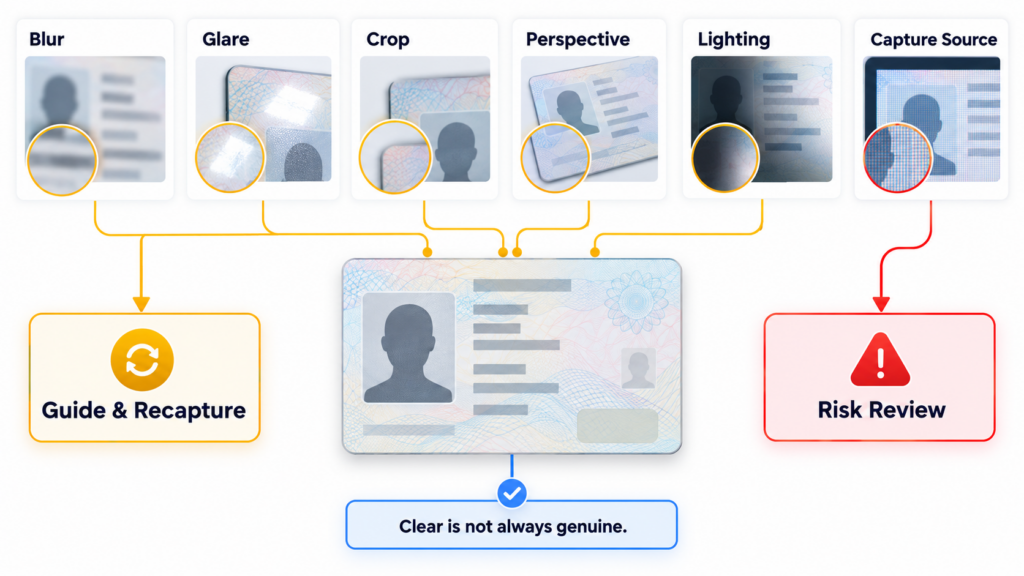
- Blur: Movement or incorrect focus obscures text and security details.
- Glare: Reflections hide portraits, fields, or protective features.
- Cropping: One or more document edges or important fields are missing.
- Perspective distortion: The document is photographed at a steep angle.
- Poor lighting: Shadows, overexposure, or low contrast reduce visibility.
- Low resolution: Compression or digital zoom removes fine details.
- Obstruction: Fingers, sleeves, stickers, or document holders cover information.
- Wrong document or side: The user submits an unsupported document, the reverse side first, or the same side twice.
- Recapture: A screen display, photocopy, or printed reproduction is submitted instead of the original document.
Some problems are simple usability failures. Others may prevent the system from determining whether the evidence is genuine.
2. Detect Quality Problems Before Submission
The most effective time to correct a capture error is while the user still has the document positioned in front of the camera.
A capture interface should evaluate document boundaries, orientation, focus, glare, brightness, perspective, and resolution in real time. Automatic capture can select a stable frame after the document is properly aligned, reducing errors caused by premature shutter presses.
Guidance should describe the specific problem:
- “Hold the document steady” for motion blur.
- “Tilt the document to reduce reflection” for glare.
- “Place all four edges inside the frame” for cropping.
- “Move closer without using digital zoom” for low resolution.
- “Capture the original document” for suspected screen or print recapture.
FinAuth can analyze capture quality before the image enters the full verification workflow. This prevents avoidable OCR failures and reduces repeated submissions without weakening downstream authenticity controls.
3. Separate Quality Errors From Security Indicators
A poor-quality image is not automatically fraudulent. A genuine customer may be using an older camera, working in difficult lighting, or capturing a worn document.
However, a technically clear image is not automatically trustworthy. A forged document, digitally edited image, screen recapture, or injected file may be sharp and correctly framed.
The workflow should therefore treat quality and security as separate questions:
- A blurred but otherwise normal capture can trigger guided recapture.
- A missing edge can require the user to reposition the document.
- An unsupported document can route to another accepted evidence type.
- Inconsistent typography, altered portraits, broken background patterns, or conflicting machine-readable data can trigger risk review.
- Screen, print, metadata, or injection indicators can increase capture-integrity risk even when the image looks clear.
NIST distinguishes identity validation from identity verification. Validation assesses whether evidence is authentic, accurate, and valid, while verification confirms that the applicant is the person associated with it. Automated document validation is one accepted validation method, but the document must still be linked to its genuine owner.
4. Improve OCR Through Better Capture and Cross-Checks
OCR accuracy depends heavily on the submitted image. Blur, glare, perspective distortion, and compression can change characters or prevent fields from being read.
FinAuth OCR can extract structured fields such as name, date of birth, document number, and expiry date. The extracted data can then be checked against:
- The visible document fields
- Available MRZ or barcode data
- Expected field formats
- Document type and layout
- User-submitted information
- Authoritative or credible sources, where available
A low-confidence character should not silently become verified customer data. The system can request confirmation, recapture the document, or route a material inconsistency for review.
NIST requires identity evidence validation to examine whether evidence is in the correct format, contains complete information, includes expected security features, and shows no signs of counterfeiting or tampering.
5. Build Recovery Paths That Preserve Progress
Repeatedly restarting the entire onboarding journey creates unnecessary abandonment. A better recovery process preserves completed steps and asks the user to repeat only the failed capture.
Useful controls include:
- Retaining successfully extracted information during recapture
- Showing field-level or image-level error messages
- Displaying a simple visual framing guide
- Allowing controlled retries
- Switching to an alternative supported document
- Providing an accessible or assisted verification route
- Escalating repeated suspicious attempts instead of offering unlimited retries
Retry limits should consider the full session context. Several ordinary lighting failures may justify better guidance, while repeated submissions from an anomalous device with changing document data may require stronger verification.
NIST recommends offering different proofing options and exception handling while ensuring that alternative paths provide comparable assurance.
6. Use a Multi-Layer Verification Workflow
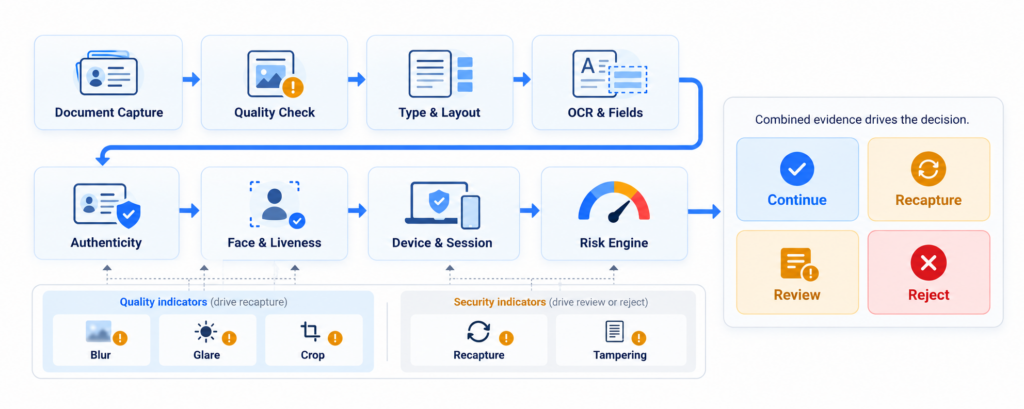
Document capture should feed a broader identity decision rather than operating as an isolated pass-or-fail check.
A FinAuth workflow can combine:
- Capture quality: Is the image usable?
- Type and layout: Does the document match an expected template?
- OCR and consistency: Are fields readable and mutually consistent?
- Authenticity: Are security features and visual structures credible?
- Manipulation detection: Are there signs of editing or compositing?
- Face Verification: Does the applicant match the trusted portrait?
- Liveness Detection: Is a genuine person present?
- Device and session intelligence: Is the capture environment trustworthy?
- Risk Engine: What action is proportionate to the combined evidence?
The outcome may be approval, guided recapture, step-up verification, manual review, or rejection. No single quality score, OCR result, or device signal should determine the decision alone.
NIST similarly recommends layered fraud controls and ongoing monitoring because remote proofing threats, technologies, and applicant populations change over time.
7. Measure Capture Performance and Fraud Together
Businesses should evaluate whether capture improvements increase completion without admitting weaker evidence.
Important metrics include:
- First-attempt capture success
- Eventual verification completion
- Recapture and abandonment rates
- Errors by document type, market, device, and browser
- OCR confidence and field-correction frequency
- Average attempts per successful capture
- Manual-review volume
- Confirmed fraud following repeated attempts
- Screen, print, manipulation, and injection detection rates
These measurements help teams determine whether a problem comes from interface guidance, camera conditions, document coverage, OCR performance, or risk policy.
8. Document Capture Q&A
Why do identity document captures fail?
The most common reasons are blur, glare, cropped edges, poor lighting, perspective distortion, low resolution, obstruction, and submission of an unsupported document or incorrect side.
How can businesses reduce document recapture rates?
They can analyze image quality in real time, use automatic capture, provide error-specific instructions, preserve completed steps, and request only the failed image again.
Should a clear document image be approved automatically?
No. Visual clarity only establishes that the image is usable. FinAuth can also evaluate document structure, extracted-field consistency, authenticity, manipulation risk, capture source, face matching, liveness, and session context.
How does FinAuth distinguish capture errors from fraud?
FinAuth separates correctable quality issues from authenticity and capture-integrity indicators. Ordinary problems can trigger guided recapture, while suspected alteration, recapture, injection, or cross-field inconsistency can enter risk review.
What should happen after repeated capture failures?
The workflow should evaluate the failure type and surrounding risk. Genuine quality problems may need alternative guidance or assisted verification. Repeated failures combined with document, device, or behavioral anomalies may justify step-up verification or review.
9. Conclusion
Reducing document capture errors requires more than accepting lower-quality images. Effective onboarding detects problems early, explains how to correct them, preserves user progress, and keeps usability failures separate from security threats.
By combining guided capture, OCR, Document Verification, Face Verification, Liveness Detection, device intelligence, and risk-based orchestration, FinAuth helps genuine customers complete onboarding while maintaining strong identity assurance.