Digital onboarding allows customers to open accounts, apply for services, and complete KYC without visiting a physical location. However, it also gives fraudsters opportunities to submit counterfeit documents, altered genuine IDs, digitally composited images, and recaptured documents displayed on another medium.
Reliable detection requires more than reading the visible text. Businesses must determine whether the document matches an authentic design, whether its data is internally consistent, whether the submitted image shows manipulation, and whether the document genuinely belongs to the applicant.
1. Understand the Main Types of Document Fraud
Forged identity documents generally fall into several categories:
- Counterfeit documents: Complete reproductions created to resemble officially issued IDs.
- Altered genuine documents: Real documents with replaced portraits, edited personal data, changed expiry dates, or modified document numbers.
- Digital composites: Images assembled from genuine and synthetic document components.
- Recaptured documents: Edited documents printed on paper, displayed on a screen, or photographed again to conceal manipulation traces.
- Fraudulently obtained genuine documents: Authentic documents issued using stolen, false, or synthetic identity information.
The final category is especially important because a document may pass visual authenticity checks while still representing the wrong person. Document validation must therefore be connected with identity verification.
NIST separates these functions into evidence validation—confirming that the evidence is authentic, accurate, and valid—and verification, which determines whether the evidence belongs to the applicant. NIST SP 800-63A
2. Validate Document Type and Layout
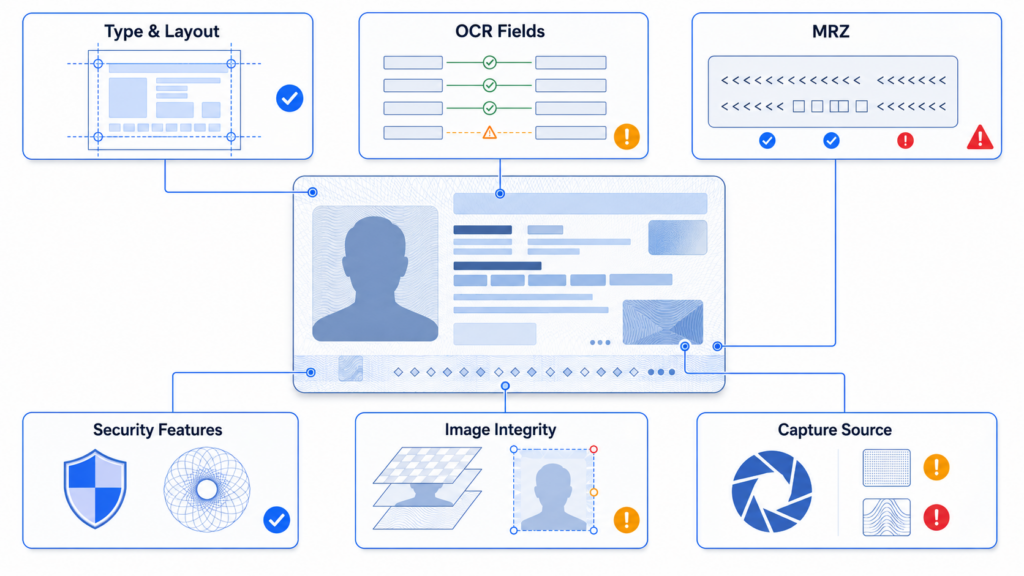
The first technical layer should determine the document’s country or issuing region, document type, and version. Each supported ID has expected dimensions, field positions, typography, portrait placement, security patterns, and machine-readable zones.
Possible forgery indicators include:
- Missing or incorrectly positioned fields
- Abnormal fonts, character spacing, or alignment
- Incorrect colors, proportions, or background patterns
- Portraits that overlap the wrong design elements
- Document numbers or dates in invalid formats
- Security features located outside their expected regions
FinAuth Document Verification compares the submitted evidence with the expected document structure. This helps identify documents that contain readable information but do not conform to a recognized official template.
3. Compare Visible and Machine-Readable Data
OCR alone only determines what text appears in an image. A forged document may contain perfectly readable text.
The extracted information should be compared across every available data source:
- Visual inspection zone
- Machine-readable zone (MRZ)
- Barcode or encoded data
- Contactless chip, where supported
- Application form information
- Authoritative or issuing-source records, where available
Names, document numbers, dates of birth, nationality, sex, and expiry dates should agree across these sources. MRZ structure, character set, field length, and check digits should also be validated.
ICAO Doc 9303 defines standardized formats and data positions for machine-readable travel documents. A mismatch with these specifications can indicate manipulation, although structural compliance alone does not prove authenticity. ICAO Doc 9303
FinAuth combines OCR extraction with cross-field and MRZ consistency checks, helping distinguish data extraction success from evidence authenticity.
4. Analyze Security Features and Image Integrity
A forged or altered document may disrupt physical and digital security features.
Systems should evaluate:
- Portrait integration and secondary facial images
- Holographic or optically variable regions
- Background patterns and line continuity
- Laminate or surface integrity
- Printing and color consistency
- Repeated textures or cloned image regions
- Local differences in sharpness, noise, or compression
- Suspicious boundaries around text and portrait fields
For chipped documents, cryptographic validation can provide stronger evidence that the data was issued by the expected authority and has not been changed. UK Companies House guidance, for example, requires identity document validation technology to validate cryptographic features where present or physical security features for non-chipped documents. Companies House identity verification standard
FinAuth analyzes document authenticity and manipulation indicators across the complete image instead of relying on one visible feature.
5. Detect Digital Editing and Recapture Attacks
Fraudsters may digitally replace fields or portraits and then conceal the edits by displaying or printing the modified document before capturing it again.
Potential recapture indicators include:
- Screen pixels or moiré patterns
- Print dots, paper texture, or artificial borders
- Inconsistent glare or surface reflection
- Repeated compression and abnormal image noise
- Perspective that does not match a physical card
- Evidence of screenshots or screen presentation
- Capture behavior inconsistent with a live document session
These signals must be interpreted carefully. Messaging applications, camera processing, low-light conditions, and ordinary compression can also change image characteristics.
FinAuth separates correctable image-quality problems from security risks. Blur or glare may trigger guided recapture, while evidence of compositing, screen display, or repeated suspicious submissions can increase the session risk level.
6. Confirm That the Document Belongs to the Applicant
Even a genuine document may be stolen, borrowed, or purchased.
After validating the document, the system should extract its portrait and compare it with a fresh facial capture. Liveness Detection should then determine whether the applicant is genuinely present rather than presenting a photograph, video replay, deepfake, or injected camera stream.
FinAuth combines:
- Document portrait extraction
- 1:1 Face Verification
- Edge and Cloud Liveness Detection
- Deepfake and injection detection
- Device and session intelligence
- Behavioral risk signals
This layered approach prevents a genuine-looking document from becoming the only basis for approval.
7. Make a Multi-Signal Risk Decision
No single OCR mismatch, image artifact, or biometric score should determine the final result.
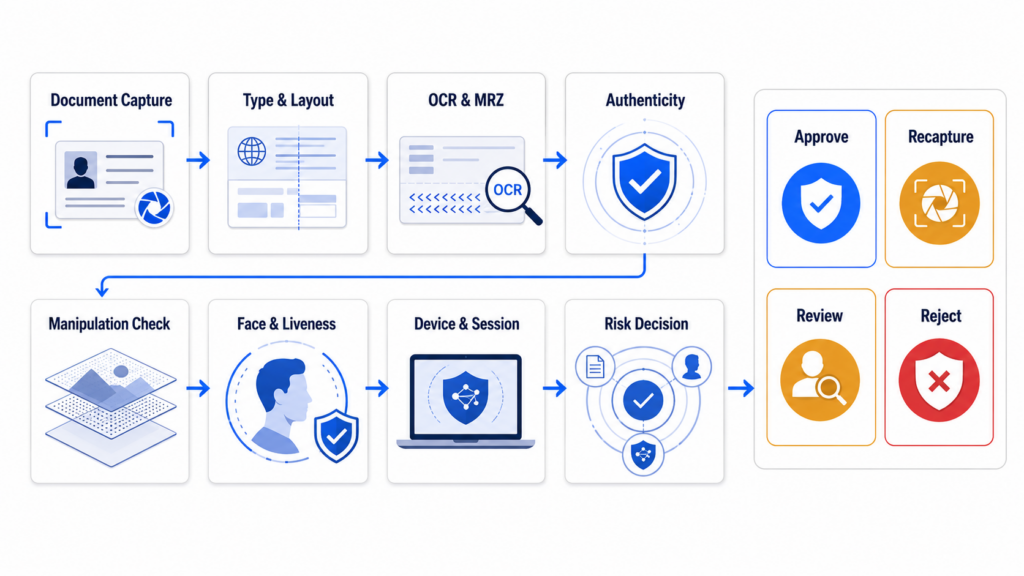
A practical workflow can apply four decision bands:
- Low risk: Authentic document, consistent data, strong face match, genuine presence, and normal session signals.
- Medium risk: Correctable image-quality problems or limited uncertainty requiring recapture.
- High risk: Multiple inconsistencies requiring stronger verification or manual review.
- Critical risk: Strong forgery, injection, impersonation, or coordinated fraud indicators requiring rejection or investigation.
The FinAuth Risk Engine combines document, biometric, device, session, and behavioral evidence. Trusted applicants can continue automatically, while uncertain and high-risk cases receive proportionate action.
8. Forged Identity Document Detection Q&A
Can OCR detect a forged identity document?
Not by itself. OCR extracts visible information but does not prove that the document design, security features, portrait, or underlying identity is genuine.
What are the most common signs of a forged ID?
Common indicators include inconsistent fonts, incorrect layouts, portrait-edge anomalies, mismatched MRZ data, invalid check digits, broken security patterns, digital compositing traces, and recapture artifacts.
Can a forged document contain a valid MRZ?
Yes. Fraudsters can generate structurally valid MRZ data and check digits. MRZ validation should be combined with template, security-feature, image-integrity, chip, and identity checks.
How does FinAuth detect forged identity documents?
FinAuth combines document classification, OCR and MRZ consistency, authenticity analysis, manipulation and recapture detection, Face Verification, Liveness Detection, and multi-signal risk decisioning.
9. Conclusion
Detecting forged identity documents in digital onboarding requires multiple layers of evidence. Readable text and a familiar-looking layout are not enough.
Businesses must validate document structure, compare data across sources, inspect security features, detect digital manipulation and recapture, and verify that the evidence belongs to a genuinely present applicant. FinAuth brings these controls into a unified workflow, helping organizations automate trusted onboarding while escalating suspicious evidence for stronger verification.